

What is a Tax-Free Savings Account (TFSA)?
The Tax-Free Savings Account, or TFSA, is one of the most effective tools available to Canadian investors. It allows you to grow your investments — whether through interest, dividends, or capital gains — without paying tax on that income. While the concept is simple, navigating the rules around contribution limits can sometimes be tricky. Knowing how much room you have in a given year is key to avoiding costly mistakes.
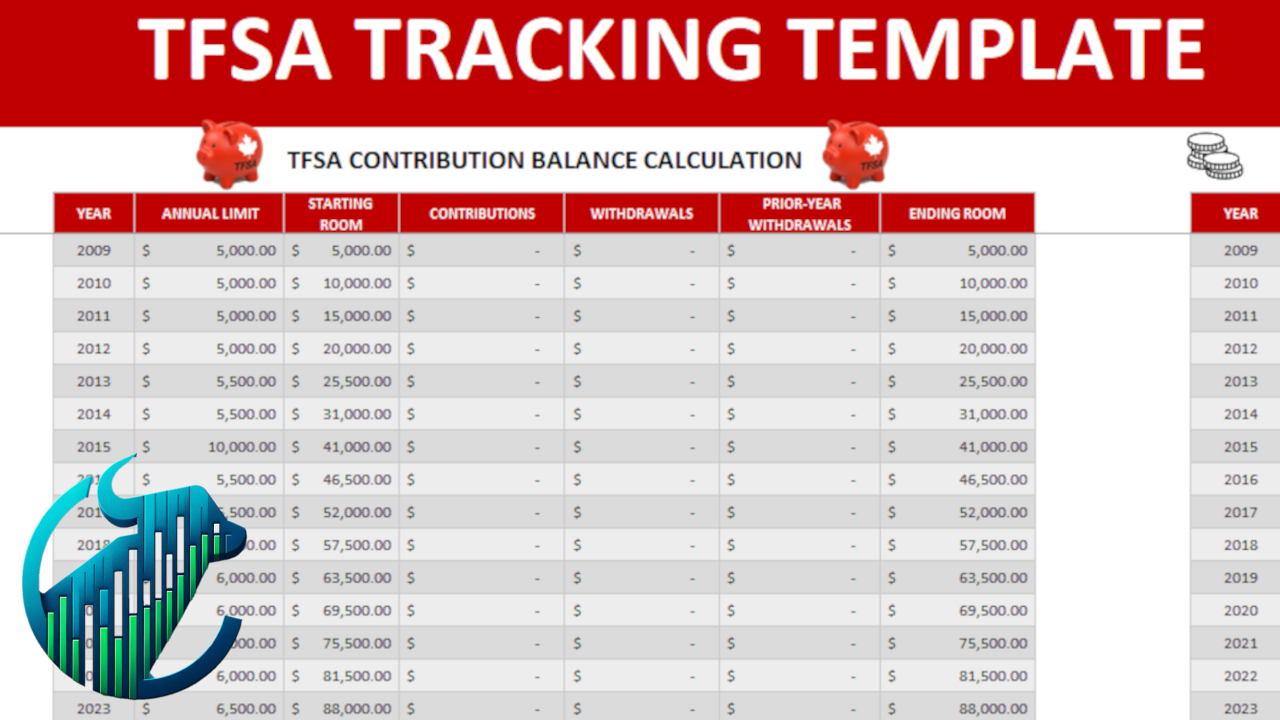
TFSA Contribution Room for 2025
For the 2025 calendar year, the annual contribution limit has been set at $7,000. This cap is determined by the federal government and is periodically adjusted upward to account for inflation.
If you were at least 18 years old back in 2009, when the TFSA program first launched, and you’ve never put money into the account, your total accumulated room by 2025 would be $102,500. That figure represents the sum of all yearly limits from 2009 to 2025.
Your personal amount may differ depending on your history of contributions and withdrawals. Contributions reduce your available room immediately, while withdrawals free up additional space only in the following year. The important point is that unused room doesn’t expire — it rolls forward indefinitely. This flexibility makes the TFSA especially valuable, since you can tailor your contributions to your finances without worrying about losing the chance to use that space later.
To confirm exactly how much room you have, it’s best to log into your CRA “My Account.” Banks and brokerages only track activity within their own institution and won’t reflect your total contribution room.
Do Withdrawals Add to My TFSA Limit?
They do, but with a delay. When you withdraw funds from a TFSA, that same amount is added back to your contribution room on January 1 of the following year.
For example, if you take out $5,000 in 2025, then beginning in 2026 you’ll be allowed to contribute an additional $5,000 on top of that year’s new limit. This feature gives the TFSA a unique advantage: it can be used for both long-term investing and shorter-term savings goals, since funds can be pulled out and later re-contributed.
The trap to avoid is re-contributing too soon. If you replace the withdrawn funds in the same calendar year without having enough unused room available, you’ll end up with an over-contribution. That error comes with a penalty of 1% per month on the excess. Because of this, it’s essential to keep a careful record of all contributions and withdrawals.
The Consequences of Over-Contributing
The most common TFSA mistake comes from misunderstanding how withdrawals affect contribution room. Unlike RRSPs, there’s no withholding tax when you withdraw TFSA funds — but the space you free up won’t be available until the start of the next year.
Here’s a scenario: Imagine you’ve already maxed out your TFSA at the 2025 cumulative limit of $102,500. If you withdraw the full amount in July and immediately deposit it again, you’ve now over-contributed by $102,500. The Canada Revenue Agency (CRA) would charge you a penalty of 1% per month on that entire overage — a staggering $1,025 for every month you leave the excess in your TFSA.
While that may be an extreme case, it illustrates how even small missteps can get costly. The lesson here is that withdrawals and contributions don’t operate on the same timeline. Contributions reduce your available room instantly, while withdrawals only restore it the following January.
Why Use a TFSA Tracker
To make things easier, using a tracker or spreadsheet can be invaluable. If you manage multiple TFSAs across different banks or brokerages, it’s easy to lose sight of your total activity. A template that logs every contribution and withdrawal ensures you always know your true available room.
By updating the sheet whenever you add or remove money, you’ll have a clear, running record that can be maintained year after year. This approach helps you avoid accidental over-contributions, keeps your accounts organized, and gives you peace of mind.
The template is designed to be straightforward, with no complicated macros — just a clean way to keep your TFSA activity in one place. It’s a small step that can save you from a major financial headache.